🎉 New: Heir Mode + Handoff Letters + MFA Tracking — The biggest update yet is here. See what's new
Secure Domain Portfolio Inheritance

Your domains outlive you.
Your plan should too.

The first inheritance vault built specifically for domain investors. Protect your portfolio, guide your heirs, and make sure nothing expires when you're gone.

AES-256
Encryption
100%
Local & Offline
$0
Server Costs
20+
Features
Domain investors pass away.
Their portfolios disappear with them.

Heirs don't know what exists

Domains are spread across multiple registrars. No one knows the full picture.

Passwords are locked in your head

Registrar logins, 2FA codes, and account details vanish when you do.

Domains expire fast

Miss one renewal and a $50,000 domain becomes someone else's auction win.

No one knows what to do

Which ones to sell? Which to keep? Who's the broker? What's it worth? Heirs are left guessing.

Most domainers
have no inheritance plan
Generic digital estate tools don't understand domains. They don't track renewals, registrars, valuations, or broker relationships. DomainWill does.
Everything your heirs need.
Nothing they don't.
Built for the way domainers actually work — not a generic password manager with a "digital assets" checkbox.
🏢

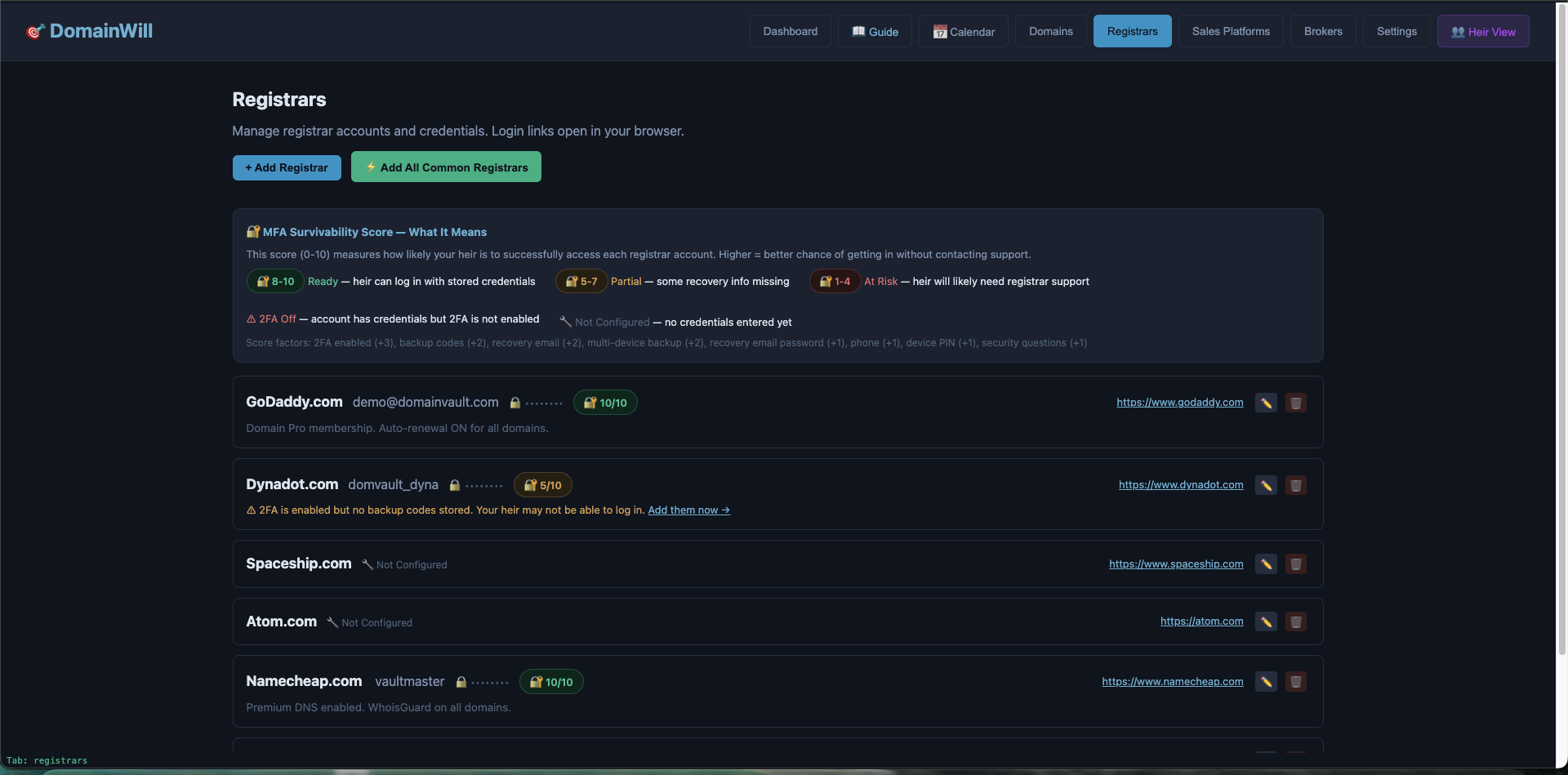
Registrar Vault

Store login credentials for every registrar — GoDaddy, Dynadot, Namecheap, and more. Encrypted in your vault, click-to-reveal when you need them.

📊

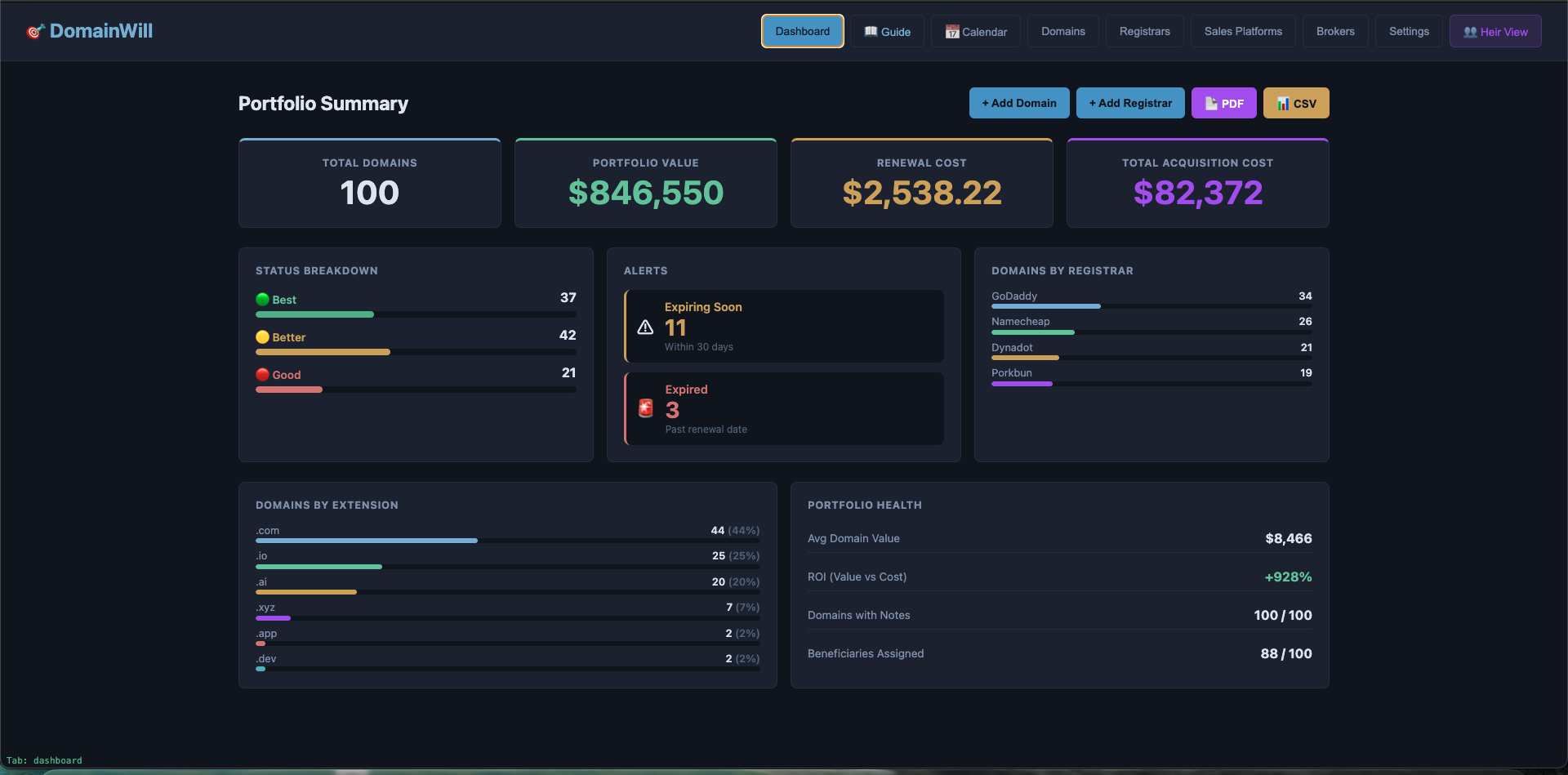
Portfolio Dashboard

Total value, renewal costs, acquisition costs, expiring domains — all at a glance. Status bars, registrar distribution charts, and portfolio health metrics.

📝

Per-Domain Instructions

Tell your heirs exactly what to do with each domain. Keep it. Sell for at least $X. Contact this broker. Let it expire. Your voice, preserved.

🤝

Broker Contacts

Track which brokers handle which domains. Pre-written email templates for heirs. Your heirs know exactly who to call and what deals are in progress.

💀

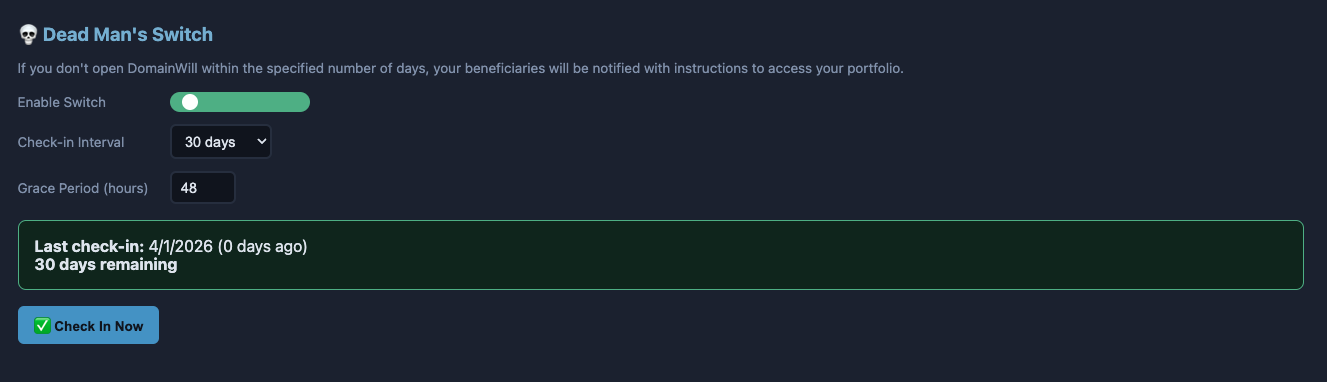
Dead Man's Switch

Haven't opened the app in 30 days? Your beneficiaries automatically receive instructions and your encrypted vault. Configurable intervals and grace periods.

📄

Inheritance PDF

One-click export of a professional inheritance packet. Full inventory PDF and a stripped-down emergency PDF with no financial data for safe sharing.

NEW
🔐

MFA Tracking & Survivability Scores

Track 2FA settings, backup codes, recovery emails, SMS phone numbers, device lock screen PINs, and security questions for every registrar. Each gets a survivability score so you know if your heir can actually log in.

NEW
📝

Handoff Letter PDF

A one-page printable letter designed to be stored with your physical will. Tells your heir what DomainWill is, where to find the vault, and who to contact.

NEW
🚫

Do Not Touch Domains

Flag critical domains that heirs should never modify, transfer, or let expire. Shown in a prominent red warning zone with special instructions.

NEW
💰

Revenue Continuity Tracking

Document what revenue each domain generates and what breaks if it lapses. Heirs see this prominently so they understand the urgency.

NEW
🔑

Access Method Documentation

Document exactly how your heir will find the vault password — safe deposit box, attorney, trusted family member, or Dead Man's Switch.

🏪
New

Sales Platform Vault

Manage Afternic, Sedo, Atom and other sales platform accounts with full credential storage and MFA tracking — so your heir can access active listings.

✏️
New

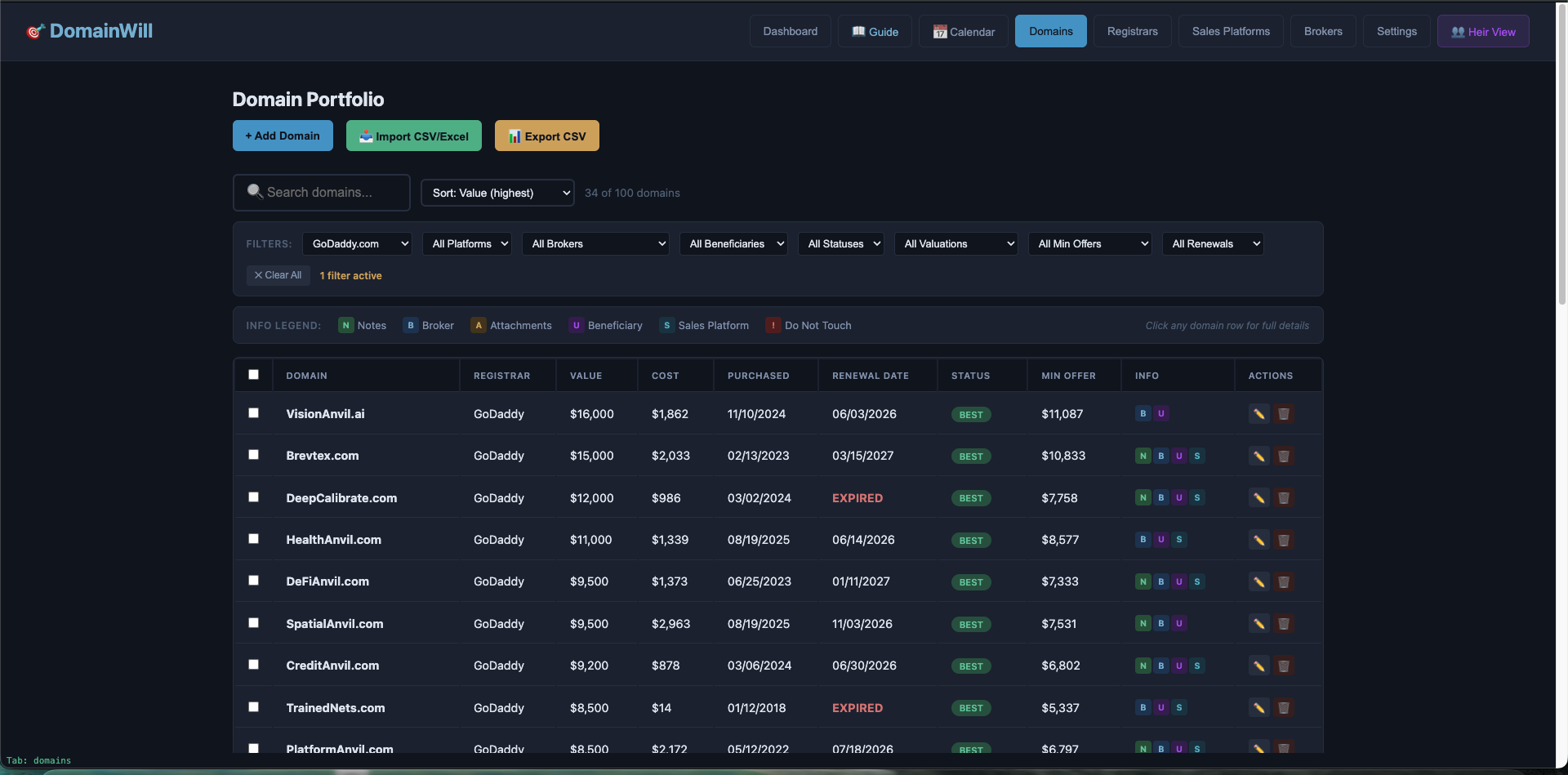
Bulk Domain Editor

Select multiple domains and edit any field globally. Combined with advanced filters, update entire subsets of your portfolio in seconds.

🔍
New

Advanced Filters

Filter domains by registrar, sales platform, broker, beneficiary, valuation range, and minimum offer. Stack filters for precise portfolio management.

📖
New

Owner's Guide

Built-in order-of-operations walkthrough. Understand how auto-populations, MFA backup codes, and every feature works together.

💾

Encrypted Backups

Export your entire vault as an encrypted backup file. Save to Dropbox, iCloud, or USB. If your computer fails, restore on any machine in seconds.

New
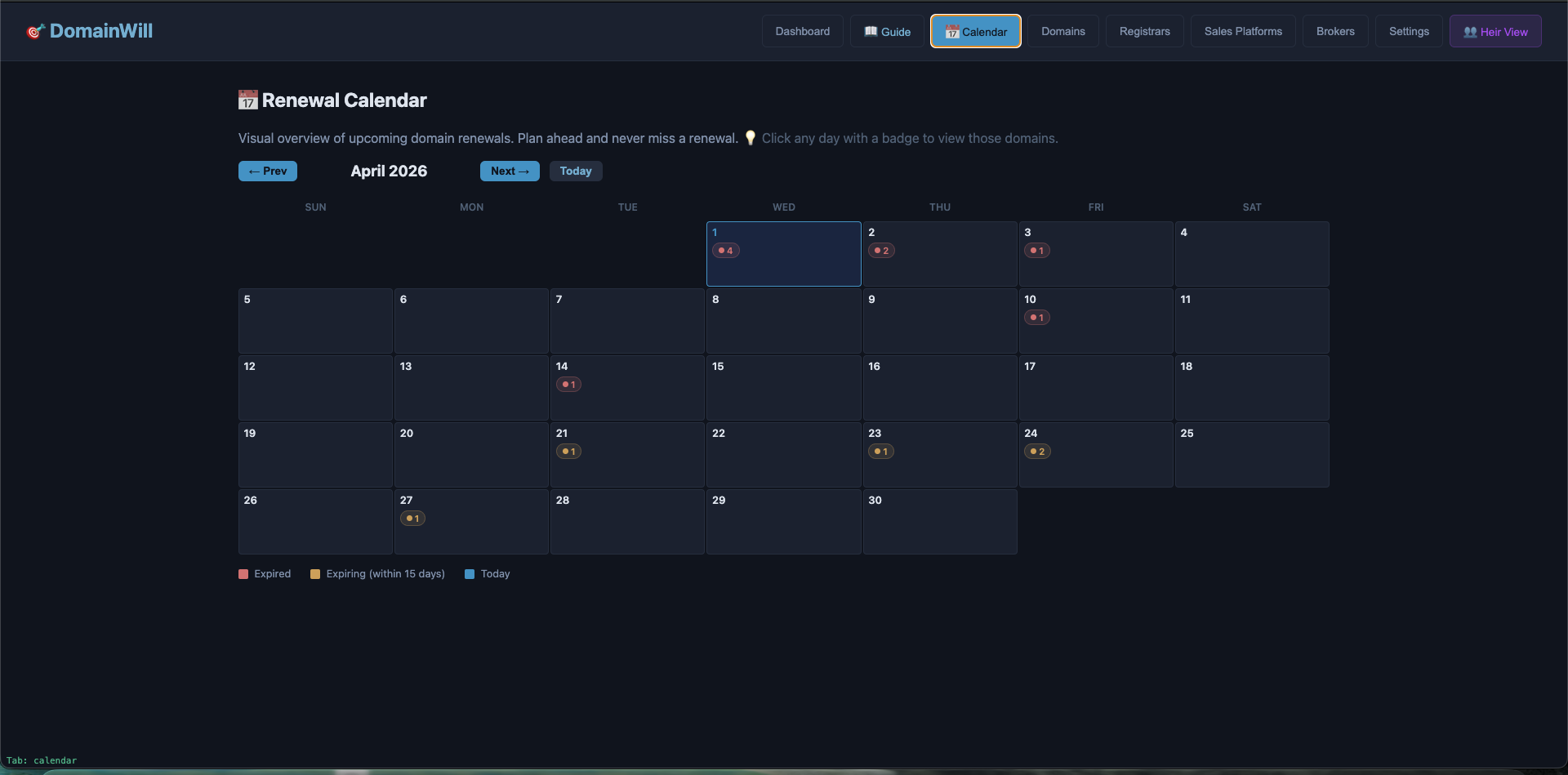
📅

Renewal Calendar

Monthly calendar view with color-coded dots for expired and expiring domains. Click any day to see details. Never miss a renewal again.

A complete experience
for the person who inherits.
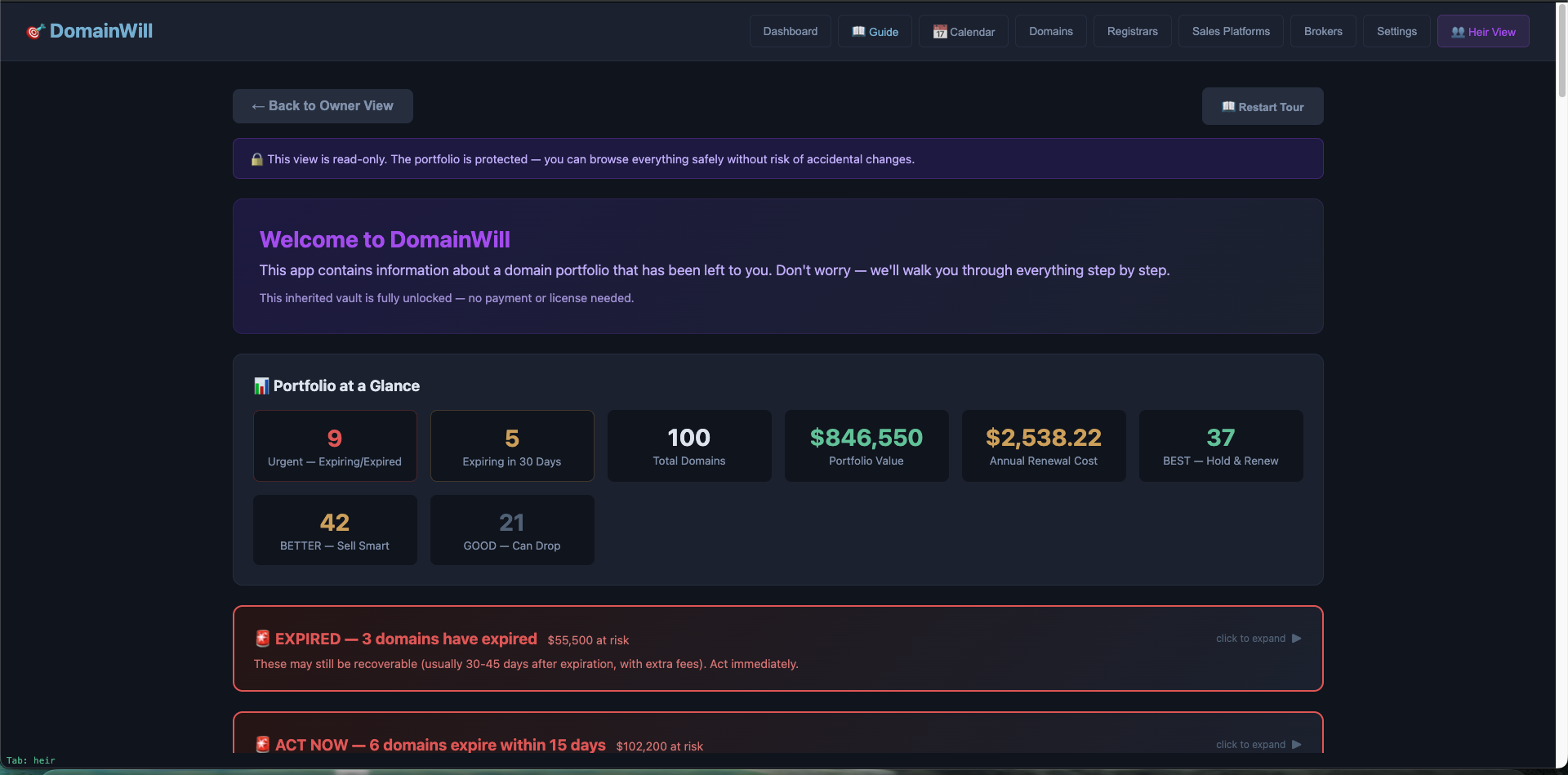
When your heir opens DomainWill, they don't see a confusing database. They see a guided, purple-themed dashboard built to walk non-technical people through everything — step by step.
🟣

Purple-Themed Dashboard

Visually distinct from the owner view so heirs always know where they are.

📖

Onboarding Walkthrough

A welcome modal explains what domains are, what to do first, and that they have time.

🚨

Urgency Alerts

Domains expiring within 15 or 30 days are called out prominently at the top.

💡

Suggested Minimum Offers

Smart pricing guidance based on owner's valuations — so heirs don't panic-sell.

📋

6 Guided Workflows

Step-by-step guides: renew, transfer, sell, contact a broker, handle 2FA, consolidate registrars.

📖

Domain Glossary (17 terms)

Plain-English definitions of every domain term they'll encounter.

💸

Liquidation Options

For heirs who just want to sell everything — broker vs. self-service guidance with fire-sale warnings.

🔒

Read-Only Safe Mode

Heir view starts locked — no accidental changes until they explicitly unlock.

👥

Built for Non-Domainers

Your spouse, kids, or attorney don't need to understand the domain industry. Heir Mode translates everything into plain language with actionable next steps.

Pre-written broker inquiry emails
Registrar-specific account recovery instructions
Domains sorted by priority (BEST → BETTER → GOOD)
Consolidation guidance when domains span multiple registrars

👥 Heirs never pay. If you received a vault file from a family member, attorney, or the Dead Man's Switch — just install the app and import it. Full access, no license required. Your loved one already took care of it.

Set it up once. Sleep easy forever.
7 steps. 15 minutes. Complete peace of mind.
1

Create Your Vault

Set a strong master password and generate a 12-word recovery phrase. Store both safely.

2

Add Registrars

Add your registrar accounts with login credentials, 2FA settings, backup codes, and device PINs.

3

Add Domains

Import from CSV/Excel or add manually. Include valuations, status tiers, and minimum offers.

4

Set Up Beneficiaries

Add the people who will inherit your portfolio. Document your access method.

5

Configure Switch

Enable the Dead Man's Switch. Choose your check-in interval and grace period.

6

Print Handoff Letter

Generate the one-page letter that tells your heir everything they need to get started.

7

Store & Live

Store the handoff letter with your will. Open the app occasionally to check in. That's it.

Military-grade encryption.
Zero trust architecture.
Your data never leaves your machine. We don't have servers. We can't see your data. That's by design.
🔐

AES-256 Encryption

The same standard used by governments and banks. Your entire database is encrypted at rest with your master password.

💻

100% Local

No cloud. No servers. No network calls. Your encrypted vault lives on your hard drive and nowhere else.

🚫

Zero Knowledge

Your password is never stored anywhere — not on disk, not in memory after logout, not in any log file. We literally cannot access your data.

📧

Email-Safe Design

The Dead Man's Switch sends instructions + an encrypted vault file. Without the password, it's an unreadable blob. Intercepted? Useless.

Your portfolio's
insurance policy.

Configure a check-in interval. If you don't open DomainWill within that window, your beneficiaries receive everything they need — automatically.

1

Timer Expires

You haven't opened the app within your configured interval (7 days to 1 year).

2

Grace Period Warning

A warning email is sent: "Check in within 48 hours." This catches vacations and busy weeks.

3

Full Trigger

If no check-in after the grace period, your beneficiaries receive: instruction PDF + encrypted vault file + download link for DomainWill.

4

Heirs Take Action

They install DomainWill, load the vault with your password (from your safe deposit box), and follow your per-domain instructions.

Frequently Asked Questions

What is DomainWill?

DomainWill is a desktop app built specifically for domain investors to organize their portfolio for inheritance. It stores your registrar credentials, domain valuations, broker contacts, and heir instructions — all encrypted locally on your machine. When something happens to you, your heirs have everything they need.

Is my data sent anywhere?

No. No. DomainWill is 100% local. Your data is encrypted with AES-256 and stored on your hard drive. There are no servers, no cloud sync, no telemetry, and no network calls. We literally cannot see your data even if we wanted to.

What encryption does it use?

AES-256 via CryptoJS — the same encryption standard used by governments and financial institutions. Your entire vault database is encrypted at rest with your master password. The password itself is never stored anywhere.

What happens if I lose my password?

If you set up a 12-word recovery phrase (strongly recommended), you can use that to unlock your vault. After logging in with your recovery phrase, you'll be prompted to set a new password immediately — so you're never stuck without one. If you have neither your password nor recovery phrase, your data is permanently inaccessible — that's encryption working as designed. This is why we recommend storing your password in a safe deposit box and generating a recovery phrase.

How does the Dead Man's Switch work?

You configure a check-in interval (7 days to 1 year). Every time you open DomainWill, the timer resets. If you don't open it within your interval, a grace period starts (configurable, default 48 hours). If you still don't check in, your beneficiaries automatically receive an email with your inheritance PDF and encrypted vault file.

Can my heir accidentally sell or delete my domains?

Heir Mode starts in read-only safe mode — no changes are possible until they explicitly unlock it. Domains flagged as "Do Not Touch" are shown in a prominent red warning zone. The app guides them to contact a broker before making any major decisions.

What registrars are supported?

All of them. DomainWill stores credentials manually — it doesn't connect to registrar APIs. You add your registrar name, login URL, username, password, and MFA details. Common registrars (GoDaddy, Dynadot, Namecheap, Spaceship, Porkbun, Sav, Atom) are pre-loaded for quick setup.

Is there a mobile version?

Not currently. DomainWill is a desktop app (Mac, Windows, Linux) because that's where domain investors do their work. A mobile companion app may come in the future, but the focus right now is making the desktop experience bulletproof.

How much does it cost?

$99 one-time payment for a lifetime license. Start with a 14-day free trial, no credit card required. If it's not for you, just don't buy. No subscriptions, no recurring fees. Heirs never pay — anyone who receives an inherited vault gets full access for free.

Can I export my data?

Yes. Export your full portfolio as CSV, generate a professional inheritance PDF, create an emergency PDF (no financial data), print a handoff letter for your will, or create encrypted backup files you can store anywhere.

What's Heir Mode?

Heir Mode is a separate purple-themed dashboard designed for the person who inherits your portfolio. It translates everything into plain language, provides step-by-step guides (renew, transfer, sell, contact a broker), a domain glossary, suggested minimum offers, liquidation options, and pre-written email templates. It's built for non-domainers.

How do I set up my beneficiaries?

Go to Settings → Beneficiaries and add anyone who should receive your inheritance instructions. Include their name, email, phone, and relationship. You can also assign individual domains to specific beneficiaries in the domain editor. When the Dead Man's Switch triggers, they all get notified.
Get in Touch
Questions, feedback, or partnership inquiries — we'd love to hear from you.
✅ Message sent! We'll get back to you soon.

Other Ways to Reach Us

Simple pricing. No surprises.
Try everything free for 14 days. No credit card required. Your heir never pays.

Don't let your portfolio
become someone else's windfall.

Download DomainWill today. Set it up in 15 minutes. Never worry about your domains again.

Linux also available. 14-day free trial — no credit card required.

Mac: Open the DMG and drag DomainWill to your Applications folder.

Windows: Run the installer. When prompted, choose "Just Me" (recommended) — this installs without needing admin access. You may see a SmartScreen warning on first run — click "More info" → "Run anyway."

Both: Your vault is stored locally — nothing is sent to the cloud. To uninstall, use your system's normal app removal process.